
Download SnapIt – Free Screen Capture Tool for Windows, Mac, Android & iOS
SnapIt is a lightweight, fast, and secure screen capture software designed for users who need to capture specific parts of their screen with precision and ease. Whether you're a student preparing a presentation, a professional sharing insights via email, or a casual user documenting a tutorial, SnapIt delivers a seamless screenshot experience without the clutter. Unlike traditional tools that capture the entire desktop, SnapIt lets you select only the area you want—no extra editing required.
With customizable settings, support for multiple file formats, and a simple drag-and-drop interface, SnapIt ensures every capture is clean, efficient, and ready to use. The app runs quietly in the background, doesn’t require internet access, and is compatible with Windows, Mac, Android, and iOS devices. Download SnapIt today and take control of your screen captures with confidence.
Effortless Screen Capture with Precision and Control
SnapIt redefines how users capture their screens by offering a level of precision that most built-in tools lack. Instead of relying on the standard Print Screen key—which often captures the entire desktop, including irrelevant windows and clutter—SnapIt gives you full control over what gets captured. From the moment you launch the app, your cursor transforms into a plus sign, signaling that you're in capture mode. Simply click, hold, and drag to outline the exact portion of your screen you want to save. The dynamic guiding lines help you align your selection perfectly, ensuring no unwanted elements are included. Once you release the mouse button, the screenshot is instantly captured and sent to your designated output folder. One of the standout features of SnapIt is its ability to let you edit the image before saving. You can add annotations, draw arrows, blur sensitive information, or highlight key areas directly within the app. This eliminates the need to open a separate image editor, saving valuable time. Whether you're highlighting a bug in a software interface, pointing out a section in a spreadsheet, or creating a step-by-step guide, SnapIt makes the process intuitive and efficient. The app supports multiple image formats, including PNG, JPG, BMP, and WEBP, so you can choose the best file type based on your needs. For example, PNG is ideal for high-quality graphics with transparency, while JPG works well for compressed images in emails. Additionally, SnapIt allows you to customize the file name, save location, and even set a default format—great for users who follow a consistent workflow. The tool is especially beneficial for remote workers, educators, and content creators who need to produce clean, professional visuals quickly. Its lightweight design ensures it doesn’t hog system resources, making it a reliable companion on both older and newer machines.Customization, Compatibility, and Seamless Integration
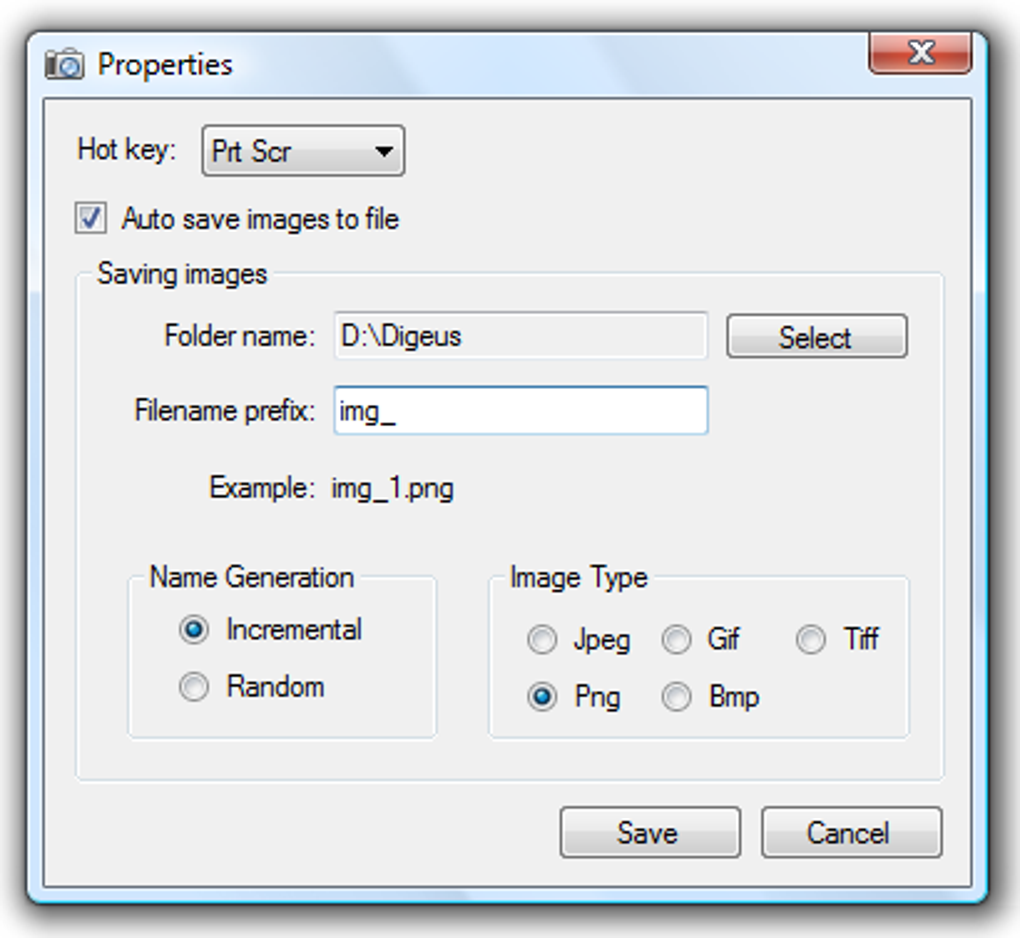
SnapIt shines not only in its core functionality but also in its flexibility and broad compatibility. The app is designed to work seamlessly across multiple platforms, including Windows 10/11, macOS, Android, and iOS. This cross-platform support means you can capture screenshots on your laptop and seamlessly transfer or view them on your mobile device—perfect for teams collaborating across devices. Whether you're using a Windows desktop, MacBook, or an Android tablet, SnapIt adapts to your environment with minimal setup. Customization is at the heart of the SnapIt experience. In the Properties window, you can modify the default hotkey to trigger a capture instantly—ideal for users who prefer keyboard shortcuts over mouse navigation. You can also set automatic naming conventions (e.g., “Screenshot_001”, “Meeting_Notes_2024”), choose your preferred output folder, and even enable auto-upload to cloud storage if needed. These settings ensure that every capture is organized and easy to locate later. The app is completely offline—no internet connection required—making it a secure choice for capturing sensitive data, confidential documents, or internal communications. This is a major advantage over cloud-based tools that may store or transmit your screenshots. SnapIt processes everything locally, giving you full privacy and control. It also runs silently in the background, consuming minimal CPU and RAM, so your system remains responsive even during prolonged use. For users who frequently share screenshots via email or messaging apps, SnapIt integrates smoothly with common file managers and communication platforms. You can set the app to automatically copy the screenshot to the clipboard or open it in your default image viewer right after capture. This streamlined workflow reduces friction and boosts productivity.Pros and Cons: A Balanced Look at SnapIt
SnapIt offers a compelling package for anyone in need of a reliable screen capture tool. Here’s a breakdown of its strengths and limitations to help you decide if it’s the right fit.- Pros:
- Highly precise selection of screen areas with drag-and-drop interface
- On-the-fly editing tools like annotations, blur, and highlights
- Support for multiple image formats (PNG, JPG, BMP, WEBP)
- Customizable hotkeys, file names, and save locations
- Lightweight and runs efficiently without slowing down your system
- Secure and offline—no internet required
- Available for Windows, Mac, Android, and iOS
- Free to download and use with no hidden costs
- Cons:
- Limited advanced editing features compared to full-fledged editors like Photoshop
- No built-in cloud sync or sharing directly from the app
- Interface is minimal—may feel too basic for power users seeking complex workflows
- Updates are infrequent; some users report delays in new feature rollouts
- Mobile version lacks some desktop-level customization options
Frequently Asked Questions (FAQ)
Is SnapIt free to download and use?
Yes, SnapIt is completely free to download and use. There are no trial periods, subscription fees, or hidden charges. The core features are fully accessible without any limitations.
Which operating systems does SnapIt support?
SnapIt is compatible with Windows 10 and 11, macOS, Android, and iOS. You can install it on your desktop, laptop, tablet, or smartphone for consistent screen capture across devices.
Can I edit screenshots directly in SnapIt?
Yes, SnapIt includes basic editing tools such as drawing, highlighting, blurring, and adding text. These features allow you to annotate your screenshots before saving or sharing them.
Does SnapIt require an internet connection?
No, SnapIt works entirely offline. All captures and edits are processed locally on your device, ensuring your data remains private and secure.
How do I change the default hotkey for capturing screenshots?
Go to the Properties window in SnapIt, navigate to the Hotkey settings, and assign a new keyboard shortcut of your choice. This allows for quick access without launching the app.







